The Best Compression Algo Maybe
Compression Algorithms: The Unsung Heroes of the Internet
Compression algorithms are the silent workhorses that made the internet boom of the 1990s possible. They enabled pirates to download gigabytes of data squeezed into mere megabytes, albeit with a tradeoff: higher electricity bills during decompression or the patience to wait as files unraveled byte by byte.
In modern times, compression is often overlooked. Storage is dirt cheap, and bandwidth feels limitless for most of us. Yet, compression remains invaluable, particularly in data centers and archival zones where storage efficiency takes precedence over speed. It’s no coincidence that popular filesystems like Btrfs, NTFS, and ZFS have built-in compression features. These tools may take a few extra seconds during operation, but they can save organizations thousands of dollars in hard drives or SSDs—a worthy trade-off if you ask me.
But the story today is different. We’ve moved past the era of efficient, practical compression. Now, the pursuit is maximum compression, no matter how long it takes. Shrinking gigabytes of data into a few tens of megabytes is the name of the game. Enter cmix.
Compression Today: Maximum Over Practicality
Today’s story is different. We’re less interested in efficient, fast compression and more focused on achieving maximum compression ratios. Who cares if it takes seven days to compress a file, as long as we shrink gigabytes of data into a few tens of megabytes? That’s where cmix comes in.
cmix is a lossless data compression program designed to achieve exceptional compression ratios at the cost of extreme CPU and memory usage. It consistently achieves state-of-the-art results, as seen in benchmarks like the Large Text Compression Benchmark by Matt Mahoney. cmix earned second place, just behind nncp v3.2.
Here’s the trade-off: cmix is not fast or memory efficient. For instance, in the benchmark:
- nncp v3.2 (1st place) took 241,871 seconds and used 7.6 GB of RAM.
- cmix (2nd place) took 622,949 seconds and consumed 30.95 GB of RAM.
While cmix isn’t practical for day-to-day use, it’s an exciting tool for anyone exploring extreme compression.
Setting Up cmix
Installing cmix is straightforward, though some adjustments may be needed depending on your system.
Hardware and OS Specs
For testing, I used the following setup:
1OS: Ubuntu 22.04.5 LTS x86_64
2Host: Google Compute Engine
3Kernel: 6.1.91-060191-generic
4CPU: AMD EPYC 7B13 (16) @ 2.449GHz
5Memory: 37054MiB / 64297MiB
Installation Steps
1sudo apt update
2sudo apt install git
3git clone https://github.com/byronknoll/cmix
4cd cmix
5make
If you’re lucky, this will work flawlessly. If not, here’s what I had to do to get it running on Ubuntu 22.04.5 LTS.
- Install dependencies:
1sudo apt install clang libc++-dev - Modify the
Makefile:1- CC = clang++-17 2+ CC = clang++ 3- all: LFLAGS += -Ofast -march=native 4+ all: LFLAGS += -O3 -ffast-math -march=native - Recompile:
1make
If everything works, you can run ./cmix --help which should give you:
 1cmix version 21
 2Compress:
 3    with dictionary:    cmix -c [dictionary] [input] [output]
 4    without dictionary: cmix -c [input] [output]
 5    force text-mode:    cmix -t [dictionary] [input] [output]
 6    no preprocessing:   cmix -n [input] [output]
 7    only preprocessing: cmix -s [dictionary] [input] [output]
 8                        cmix -s [input] [output]
 9Decompress:
10    with dictionary:    cmix -d [dictionary] [input] [output]
11    without dictionary: cmix -d [input] [output]
Testing cmix: Bee Movie Script
To test cmix, I used the Bee Movie script. Here are the results:
Original File
- File Size: 86,091 bytes (~85 KB)
Compressed File (cmix)
- File Size: 21,966 bytes (~22 KB)
- Time Taken: 124.65 seconds
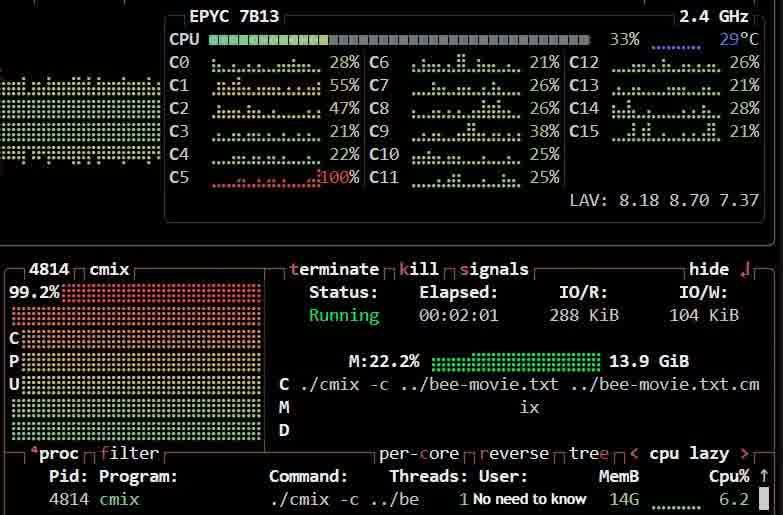
Command:
1./cmix -c bee-movie.txt bee-movie.txt.cmix
2Detected block types: TEXT: 100.0%
386091 bytes -> 21966 bytes in 124.65 s.
4cross entropy: 2.041
5
6it took 124.65 s.
Repeated trials brought the time down slightly (108.77 seconds), but it’s still not “fast.” For comparison, I tested other algorithms:
| Algorithm | Compressed Size (bytes) | Time Taken |
|---|---|---|
| gzip | 33,765 | ~0.5s |
| xz | 31,100 | ~0.5s |
| zstd (level 22) | 31,639 | ~0.5s |
| zpaq | 25,195 | ~0.8s |
| cmix | 21,966 | 124.65s |
While cmix achieves the best compression, its time and resource demands are immense.
Compressing the Linux Kernel
For a tougher test, I attempted to compress the original Linux 1.0 source code (released on March 13, 1994). Here are the numbers:
| File | Size (bytes) | Time Taken |
|---|---|---|
| Original | 5171200 (5.0M) | - |
| gzip | 1259175 (1.3M) | ~0.308s |
| xz | 935892 (914K) | ~2.895s |
| zstd | 697924 (682K) | ~16.73s |
| cmix | 516406 (505K) | 7441.04s (131m34.256s) |
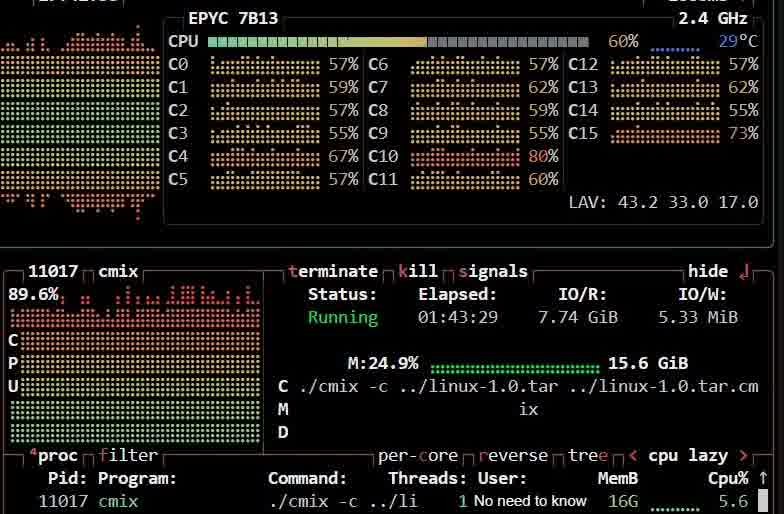
 1time ./cmix -c ../linux-1.0.tar ../linux-1.0.tar.cmix
 2Detected block types: TEXT: 91.3% DEFAULT: 8.7%
 3progress: 12.32%
 4progress: 20.16%
 55171200 bytes -> 516406 bytes in 7441.04 s.
 6cross entropy: 0.799
 7
 8real    131m34.256s
 9user    121m12.508s
10sys     2m52.326s
I initially planned to test the Linux 6.12.3 tarball (1.54 GB), but cmix proved impractical, taking over 9 minutes to reach just 0.01% progress. Even older versions like Linux 2.5 took too long. This highlights cmix’s limitations with large files.
Final Thoughts
Despite its impracticality for everyday use, cmix holds a special place in my heart. It was the first program I compiled while working on my project, osqr, and exploring its potential was both fun and enlightening. Compression may feel like a relic of the past, but tools like cmix remind us of the art and science behind squeezing data to its absolute minimum.
If nothing else, cmix is a testament to how far we can push the limits of lossless compression. It may not be practical, but it’s a lot of fun.
What are your thoughts on cmix and other compression algorithms? Let me know below!